Web demo · a 2-minute guide
How the demo works
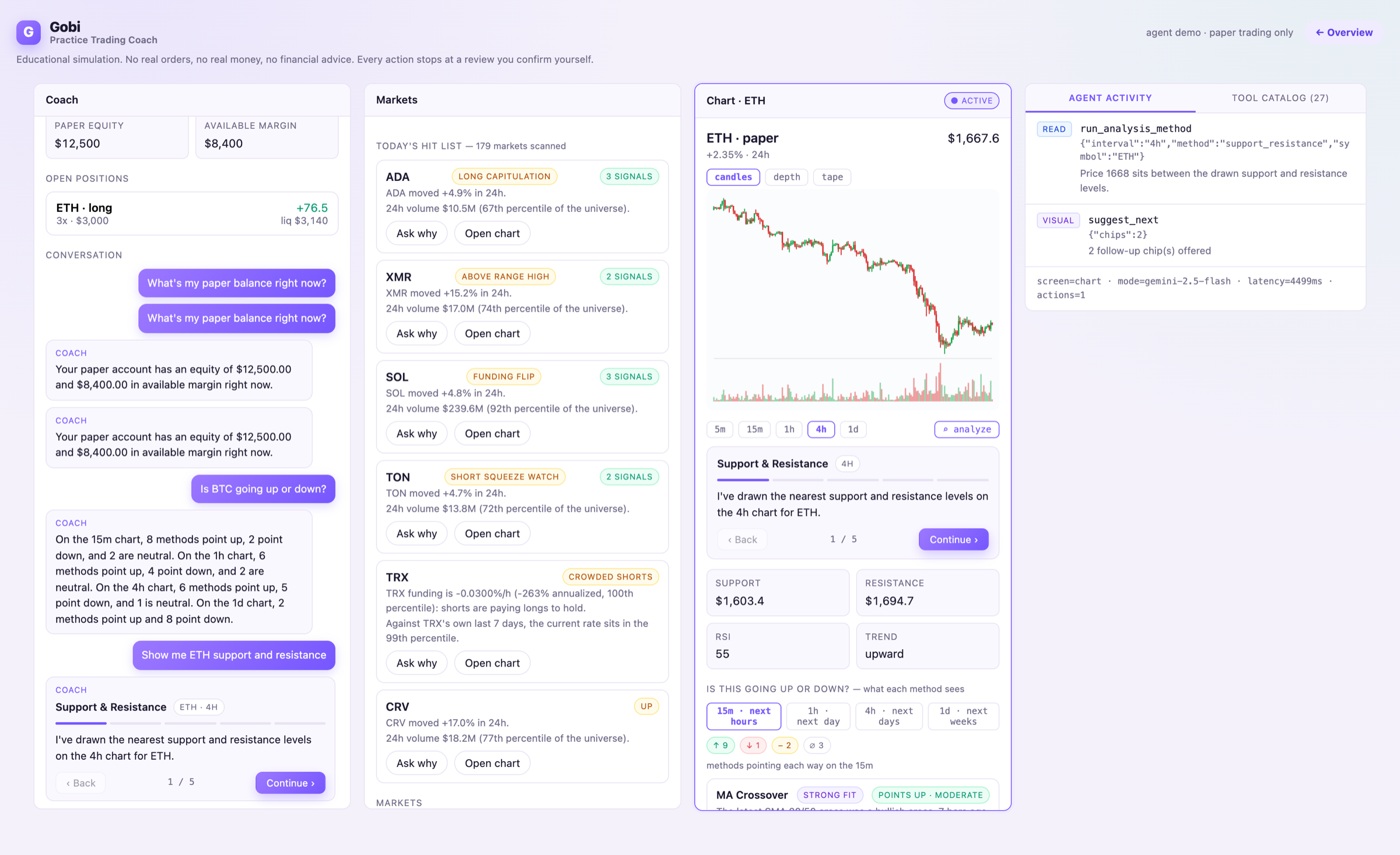
Gobi is a practice trading coach. The thing to notice: the agent lives inside the product — on the chart, in the order flow, in the market scanner — not inside a chat box. Here's how to drive it.
The layout
Same agent, two skins — the demo adapts to your screen.
On a wide screen
Three linked panels + “Behind the scenes”
Coach, Markets, and Chart sit side by side; the glowing panel is the one the agent is acting on. A fourth panel, Behind the scenes, shows the live tool calls and the agent's 27-tool catalog so you can watch it work.
On a phone
One device + bottom tabs
A single simulated app surface with a persistent composer and bottom navigation. The coach still drives the screens — it navigates you to the right page as it acts.
The surfaces
Coach
Where you talk to the agent. Ask a question and it answers in short, paginated “story” beats you click through — not a wall of text.
Markets
Today's hit list. A deterministic scanner sweeps every market for volume surges, funding extremes, and breakouts. Ask the coach why something is hot.
Chart + Indicators
A deliberately simple candlestick chart. Open Indicators to pin a technical method (support, trend, momentum) — the agent draws it on the chart for you.
Position
Where a drafted paper order lands, with its risk rails: size, leverage, and a required stop-loss — all clamped by the SDK.
How to interact
Ask a question
Type in the composer, or tap an example chip like “Is BTC going up or down?”. The coach plans a turn and acts on whichever screen is relevant.
Watch the screens move
On desktop the glowing panel is the one the agent is acting on — it might switch you to Markets, draw on the Chart, or open a Position draft. The agent drives the product.
Pin an indicator or ask the coach
In Indicators (and the Outlook list), every method has two actions: “Add to chart” pins the math on the chart with no chat; “Ask coach” has the agent explain it in plain language.
Step through the story
Longer answers play as story beats. Use Continue / Back to move at your own pace, and tap suggested chips to go deeper.
You confirm — always
Order drafts stop at a review. The agent has no place/confirm tool anywhere in its catalog: the “safety stop” is intentional, and you take the final action yourself.
What keeps it safe
Every road to an action ends at you.
Drafts only
Order size and leverage are clamped, a stop-loss is required, and there is no submit/place/confirm tool anywhere in the catalog.
Screened input
Model Armor screens every message for prompt injection and jailbreaks before the agent plans anything.
Grounded facts
Technical math is computed deterministically in the SDK engine; “why is this moving?” answers cite real, Google Search-grounded headlines — never model memory.